Boardser for Mac — App Store edition
Keep live web pages, notes, PDFs, mind maps, diagrams and tables together on a research canvas. This edition stores your boards on your Mac and works without a Boardser account.
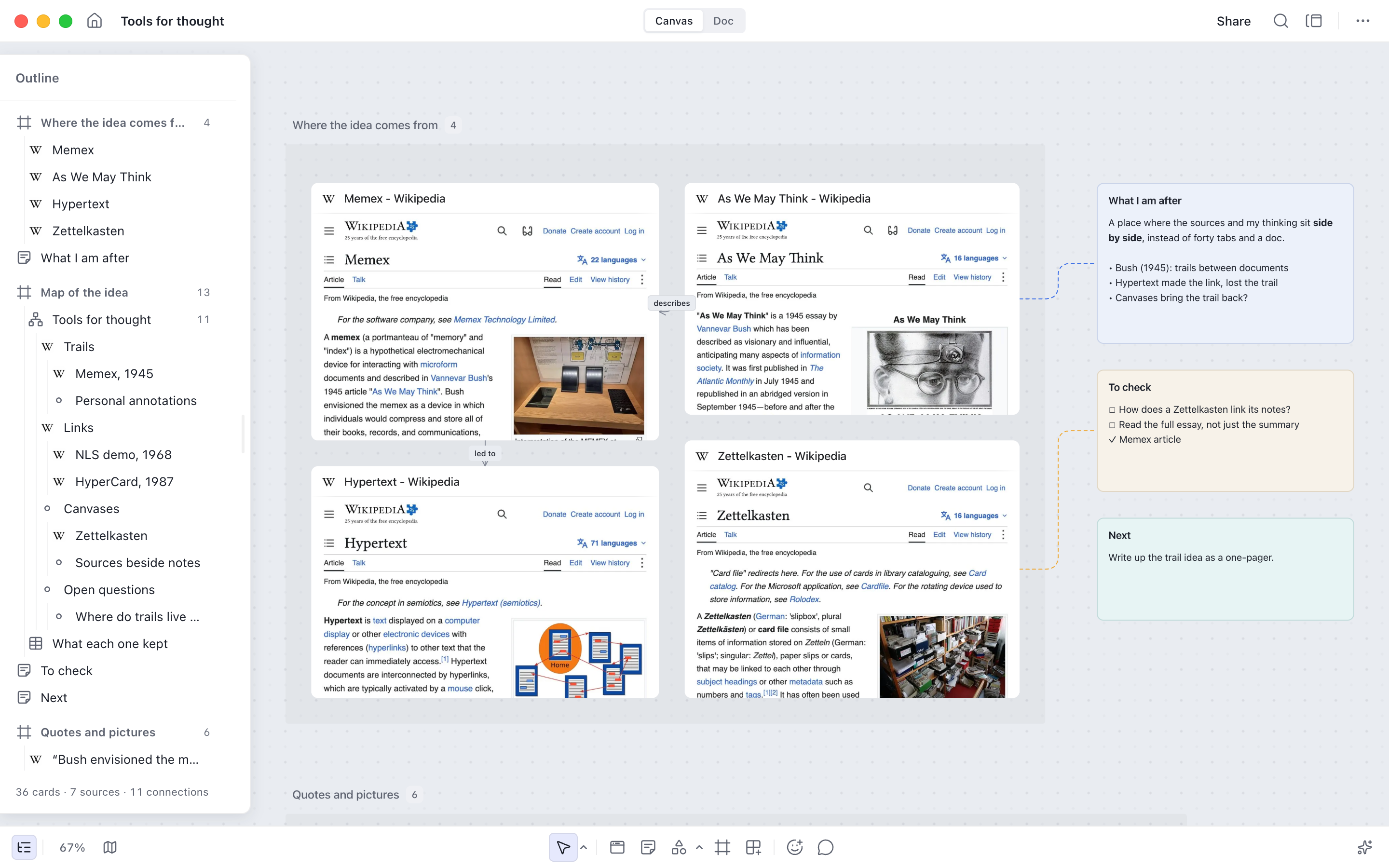
Research on your Mac
Pin a page with W, read it beside your notes, or open Side Peek with B. Double-click the board to write a note. Home organizes your boards, folders, starred items and templates.
The App Store edition has no Boardser cloud sync, shared online boards, remote publication, external AI providers, API keys or MCP connections. The website and direct-download edition have their own features and policies.
Optional Apple Intelligence
When Apple's on-device language model is available, Ask AI can help with local notes, tables and PDFs. AI controls are hidden when the model is unavailable. The canvas works without AI. This edition has no AI web search or external-model fallback.
The app requires Apple Silicon and macOS 13 or later. Optional AI requires macOS 26 or later, compatible hardware and settings, enabled Apple Intelligence and a ready on-device model.
Save and share your work
Export an editable board file or a view-only HTML snapshot. New editable exports and backups include referenced local PDF originals, up to 96 MiB of PDF originals and 256 distinct PDFs per file. Keep an additional copy of important research.
HTML snapshots preserve notes and layout for offline reading. Live websites need a connection; PDF originals are omitted and should be sent separately. Boardser does not upload or host your exports. Older board files may contain PDF references without their originals.
Support for the App Store edition
How do I reopen the window?
Choose Window > Boardser, or click Boardser in the Dock. Closing the main window saves your current board.
Where are downloaded files?
Webpage downloads open the macOS Save dialog. Choose a filename and destination, or cancel the download. Page > Downloads lists completed files under the names you selected and can reveal them in Finder. Board exports also use the macOS save dialog.
Why don't I see Ask AI?
The system's on-device model must be ready before AI controls appear. Check Apple Intelligence and language settings, and allow the system model to finish downloading. Boardser does not ask you to configure another provider.
How do I move a board to another Mac?
Export an editable board file, transfer it to the other Mac and import it. New exports include their referenced local PDFs within the limits above. Use multiple smaller exports if necessary.
Can I make a video call in a pinned page?
This edition blocks camera, microphone, device location and screen capture. Open services that need those capabilities in your usual browser.
How are updates installed?
Updates for this edition come through the Mac App Store.
Contact Boardser Support. Choose “Boardser for Mac — App Store” in the contact form and include the version and what happened. Do not send passwords, API keys or private research files you do not want to share.
App Store privacy policy · App Store terms · Website and direct-download edition